owl

Background Image - Ladybug

Follow Me Frame

Follow Me Frame

More to see

More to see

Translation Button

Welcome ladybug

Welcome ladybug

Thanks for stopping by

Thanks for stopping by. Hope you enjoy your stay!

I've noticed that I have visitors from all over the world. To make your stay more enjoyable, I have added a "translator" for you.


Tuesday, August 31, 2010

Temporary punch storage

Just discovered a temporary spot to store my MS punches, until hubby puts up some more punch racks for me. :-) You could actually store them in this container, permanently, too.

--- it’s the Iris 12” x 12” scrapbook container:-
Stores 8 sets of the MS Punch around the Page sets. Here it is completely closed:-

Friday, August 27, 2010

Owl Birthday card

I absolutely LOVE the Cricut "Wild Card" cart. and had to give the li’l owl card a go. Because I don’t have the "Hoot ‘n’ Holler" cart. that has the saying “Hoos having a birthday”, I made my own, using Design Studio and utilizing the “All Mixed Up” cart. I’m sharing the cut file, if anyone is interested.
Inside:-
Front of envie:-


RECIPE:-

Tools/Items:-
Cricut Expression
Cricut Design Studio
Cricut Cartridges (see below)
Glue (Glue Glider Pro)
Patterned Paper
Cardstock
Ribbon


Cricut Cartridges used:-

Wild Card – owl base and envelope
All Mixed Up – fonts

The owl project is on p. 72 of the "Wild Card" handbook. There are many ways of putting this card together, but I chose:-

Envelope – “Owl-s”
Envelope layers – “Icon”, reg. and shift
Owl card – “owl”
Owl layers – “liner”, reg.
Envelope front – “frame”, shift

Here’s the cut file for the sentiment.

http://www.mediafire.com/?6s66qomoaq6wasz

Tuesday, August 24, 2010

Missing tip for "Thank Ewe" card

Hiya. I forgot to mention a tip for attaching the ribbon to the stencilled "EWE" on the oval. I used a li'l brad --- hidden under the knotted part of the bow. I felt, if I used just adhesive, I'd stand the chance of it falling off. This way ---- it's going..............nowhere!! :-)

Monday, August 23, 2010

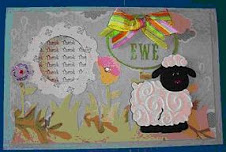
Thank Ewe Card :-)

Made the following card for a dear friend of mine. No idea why the grass is showing "brown" -- it's actually green. Maybe I forgot to water it!! LOLHere's the inside:-
If you click on each image, you will see it, in greater detail.

RECIPE:-
Tools/Items:-
Cricut Expression
Cricut Design Studio
Cricut Cartridges (see below)
Cuttlebug – Divine Swirls folder
I-Rock tool and gems
Martha Stewart Round the Page punch - Raindrops
Glue (regular, Glue Glider Pro & Zig Two-Way for small items)
Patterned Paper
Cardstock
Stickles – Waterfall, Lavender, Magenta
Ribbon
Popdots

Cricut Cartridges used:-
Animal Kingdom - sheep
Just Because Cards – card base, front, EWE’s, stencil
Straight from the Nest – grass, flowers

This card was completely designed, using the Cricut Design Studio. If you would like my cut file, here are the links for the download. I will also place it in my “FREE FILES” section.

Design Studio cut file:- http://www.mediafire.com/?g784uerm0zgvykd

Gypsy file:- http://www.mediafire.com/?l7gwcphaotwa848

The sentiment was computer-generated.

The scalloped circle was from something I had before. I have nooooo idea where it came from – if it was a Cricut cut or from a punch, or maybe even my Slice machine. :-)

NOTE: the first page has the ovals and “ewes”. Make sure you “hide contour” the “thank” on the “thank ewe” oval. I saved it w/ the “hide contour” on but, for whatever reason, it didn’t stay.

Saturday, August 21, 2010

I-Rock

Have you heard the buzz about the new I-Rock tool?
In a nutshell, the I-rock will permanently affix rhinestones, jewels and pearls to paper, fabric, albums, CD's or even furniture, to create a dazzling masterpiece!

If you want to know more, be sure to check out this website:-
http://www.imaginisceblog.com/p/i-rock-tool.html

Here is how I store mine:-
A velcroed pouch stores the instructions and templates.

Bottom area stores the I-Rock tool, inside another pouch.

Then, I have a little storage unit that houses the jewels. There is also a little pouch that is velcroed to the inside front, for storing the jewel setter sticks.
My storage unit came from the $ store. :-) You can find these cases, all over, even at your friendly WallyWorld. The I-Rock was purchased at Michael's, using a 50% off coupon. Yahooo!

Thursday, August 19, 2010

What hubby brought me back. . . .

When hubby returned from his trip, it was almost like Christmas for me. (I think he may have missed me a li’l.) :-)

I had been eyeing this li’l gadget for awhile but kept passing it up. I really didn’t think I would like it. After all, I have a whole slew of MS punches and some EK Success ones, so why would I need another punch gizmo??

Well, this is one of the things he brought back for me. He got it at Michael's.

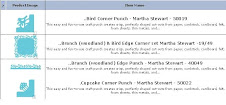
Let me tell you. . . . . . . I LOVE it. It’s totally unlike the other border punches, in that the punch mechanism moves instead of you having to move your paper, trying to line it up, etc. The craft punch thingamagig fits into knotches that moves alongside your paper. Works like a charm. :-)

Here are samples of some of the borders. And. . . . . . you can utilize the cut-outs for other projects.


I also got 2 T-shirts and a beautiful ladybug watch. How great was that, eh? As I said, just like Christmas!! Yeppers, I'm spoiled!! I think he's a keeper, eh? :-)

Wednesday, August 18, 2010

Debut of. . . . .Gina!

My Baby Girl Gypsy has finally been dubbed. . . . . .Georgina; elsewise known as “Gina”. She’s a cousin to George (George & Basic Shapes cart.). :-)

Click on her and she has a li'l message for you. :-)

Earth Worker:- planter, cultivator, grower

I chose this name as I feel my li’l Gypsy is a planter, cultivator and grower of the creativity that she generates.

She’s sporting a new outfit:- her NuShield screen protector. She LOVES it. It feels nice and cozy and her stylus just glides across it. :-)

If you wish to doll up your Gypsy w/ one of these, here are the partic’s:-

http://nushield.com/

On right-hand side, under “Applications”:-

* Click on “Handheld Devices”
* Then “ProvoCraft”
* Under “Model”, click on “Gypsy”
* Then, “Select Film Type”

And you’re good to go!

DISCLAIMER:- I am in no way affiliated w/ this Company. I’m just very happy w/ their product and wanted to share w/ all of you.

FeedJit Live Traffic Feed

Thank you for visiting ladybug

Thank you for visiting ladybug

Birdie thank you

Birdie thank you