owl

Background Image - Ladybug

Follow Me Frame

Follow Me Frame

More to see

More to see

Translation Button

Welcome ladybug

Welcome ladybug

Thanks for stopping by

Thanks for stopping by. Hope you enjoy your stay!

I've noticed that I have visitors from all over the world. To make your stay more enjoyable, I have added a "translator" for you.


Sunday, October 9, 2011

Halloween Birthday Card


Made this gate-fold card for my Mother-in-Law who has a birthday on Halloween.  Gave it to her early, as we saw her for Thanksgiving, and I didn’t want to put it in the mail, because of the bulkiness (from dimensions) of it.

 when opened:-
 back:-


Was made completely using the Happy Hauntings cartridge.  I used, however, the Imagine More cartridge for the floodfilling of the patterns on the pumpkins and the “B” in BOO.

Tools/Items:-
Cricut Imagine
Cricut Imagine Cartridge – Imagine More
Cricut Cartridge – Happy Hauntings
Glue – regular; ATG; Zig Two Way
Cardstock – double-sided for the card base; white (for the Imagine)
Patterned Paper
Ribbon – Halloween “Celebrate It”
Die Cuts – from K & Company – bats, eyes, ghost
Stickles – purple (??) and orange (Distressed Spiced Marmalade)
Seed beads – cat’s eyes
Pop dots
Sentiment -- used the following font:-  “Lunacy More”

While using my Stickles, I discovered a couple of things:-

(1)     The purple one has an “unknown identity”.  The poor li’l thing wasn’t named.  So, he’s just going to be known as “Purrrrty Purple”.  J  I have a few other ones that are nameless.  L
I wonder why these larger ones weren’t named??
(2)     The orange one is a “Distressed” one.  Noooo, he’s not suffering from distress, that’s just what Tim Holtz named him.  Having said all of that, I discovered that he has a much larger nozzle, which made his outpourings a lot thicker than the usual thin line of the regular Stickles.

I wasn’t too sure whether I liked the Distressed Stickles, or not, because of this feature.  But, I read on the Net that one can use a heat tool on these ones --- making them shimmer, which cannot be done with the regular Stickles.  I’m going to have to test these out to see the difference. J

Back to my card.  I wound a piece of ribbon around the whole gate-fold card and then glued a backing piece of cardstock to the back of the card, allowing for the ribbon to be hidden.  See pic.

Well, that ends my spiel on this card.  J


Sunday, September 25, 2011

60th Birthday Card


Made the following card for a friend who is having a rough time turning 60.  I thought the whimsical humour in this card would help a bit.   Happy Birthday, Rox!!! J  

 Inside:-

inside top:-


We're the Pirate Peg-a-leg family!  :-)


Tools/Items:-
Cricut Imagine
Cricut Imagine Cartridge – Buccaneer
Martha Stewart Punch Around the Page – Deco Fans
Glue – ATG; Zig Two Way
Cardstock – Ballet Blue (SU), which is kinda purple, for the card base; white (for the Imagine)
Patterned Paper
Rhinestone – Pink
Googley eyes
Popdots
Baker’s Twine

Created completely using the Cricut Imagine and the Imagine Buccaneer cartridge.  Love this cartridge. J The colours are so vibrant and the images are just so darn cute.  J

Used the pirate who had a li’l too much bubbly, layering his face, hat, and bottle. J  Pop-dotted the parrot and the treasure chest.
The background is the scroll available on the cart.  Computer-generated the saying that’s on the plank.  Baker’s twine is behind the sign.

Inside of the card:-

Used the MS punch around the page for the backdrop that has the pirate turtle, sentiment and jewel chest.  (rhinestone for the jewel).  The island has a palm tree and pelican.

Had a lot of fun making this card.  Sure hope Rox likes it.  J


Saturday, September 24, 2011

Winner of the My Memories Suite software

Drum roll please. . . . . 


I have a winner of the My Memories Suite software.  It's:-


which makes it:


2 
Sharon said...
What a cute LO! Thanks for doing this give-away. I love that Dog Gone Cute Word Art.

Congrats, Sharon!  I'll be contacting you w/ how you can get your new software program.  I know you're gonna LOVE it!!!  I do!!! :-)


Sunday, September 18, 2011

Digital Software Give-away

Have you ever wanted to try Digital Scrapbooking? Well, I’ve been thinking about it for some time now and all the planets must’ve been aligned because I was just given this great opportunity of trying out the MyMemories Suite software program, and just love it. :-)

And. . . one of my lucky followers will also get this chance, as I’ve been given another copy of MyMemories Suite (a $39.95 value) to give away to someone. How cool is that, eh? :-)

All you need to do is the following:-

1. If you’re not already, become a follower of my blog.

2. Visit Mymemories.com and choose your favorite digital paper pack or layout.

3. Leave a comment on this post, telling me which one is your fav! Easy peasy!

You will love this program. It’s really easy to use and has a ton of free downloads plus cute ones for purchase, with very reasonable pricing.

I especially love the “Quick Pages”, which is what I used for my Digi LO. Seeing as I had just created my very first LO the traditional way, using my sweet li’l Bailey as my subject, it only seemed apropos to use him again with my very first Digi LO. I added some Prima flowers, w/ beads, and badabing badaboom, a layout was borne. :-)


I have some more good news:-

If you want your very own copy NOW, My Memories is allowing me to offer you $10.00 off the purchase price of this great program. If you enter this special code (STMMMS86383), you pay only $29.95 (Reg. price $39.95). Just click HERE to get your software. And. . . you can also get $10 off in the MyMemories.com store. That's a $20 value just for using this code. Be sure to copy/paste this code (STMMMS86383) during checkout. The download will begin immediately and you’ll be able to play with this awesome digital software, sooner than later. J


For those entering the give-away, please don’t forget to leave me some way of being able to contact you, should you win a copy of this fabulous software. Just one comment per person, please.

You have until Saturday, Sept. 24th, 9:00 p.m. PST, to enter. I’ll draw a winner, via Random.org. and post the winner on Sunday, Sept. 25 th .

Good luck, everyone!!!


Friday, September 16, 2011

Lookie what I got. . . .

This is what I woke up to this morning. Isn't it absolutely gorgeous? It's from the "Love of my Life" of 34 years. (We got married a year to the day, after we met.) I think I'll keep him around for another 33 years. :-)


Happy Anniversary Card

It’s our anniversary today ---- 33 years. Wow! It seems like only yesterday that I fell head-over-heels for the love of my life. Happy Anniversary, Sweetheart! J
I made him this card:-
Inside:-

Close-up:-


Don't forget that you can click on the pix to enlarge them. :-)
Tools/Items:-

Cricut Imagine
Cricut Imagine Cartridges – see below
Cricut Cartridges – see below
Glue – regular;
ATG; Zig Two Way; glue gun (for the rosette)
Cardstock – double-sided for the card base; white (for the Imagine)
Patterned Paper
Bead – Blue
Paper Rosette
Popdots

Cricut Imagine Cartridges
Enjoy the Seasons – male and female hearts, and layers
Better Together – You Make my Heart Sing; Heart and layers

Cricut Cartridges
Beyond Birthdays – Happy Anniversary
Lyrical Letters – Sweetheart

Made my very first paper “rosette”, as a flower on the patterned paper. The swirls resembled a stem, so plunked a rosette flower on top.
J
I just love playing w/ my Imagine. I took the two sentiments from regular Cricut carts. and floodfilled them w/ a pattern from the Imagine cart, “Enjoy the Seasons”. All of the colours and patterns co-ordinate w/ the already-made designs, so it makes creating a card very easy-peasey.
The paper rosette was made using patterned paper. There are many tut’s on the Web, but here’s one that I really liked. It has very detailed instructions/pix.


Thursday, September 15, 2011

Latest Cricut Cartridge Check List – September 2011

Hiya. Hope you all had a great week. :-)

Provocraft released 2 more new cartridges. They just keep comin' and comin', eh? LOL

Here's my latest checklist:-

http://www.mediafire.com/?00butlm3d6lqfgo

Just to remind you that, when you click on the Cartridge name in the checklist you downloaded, it will link directly to the Cricut website, whereby you can see more info about the cartridge(s).

Also, check out this website:- http://cricutblog.org/. You'll find projects you can make w/ your new carts. :-)

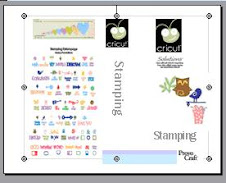
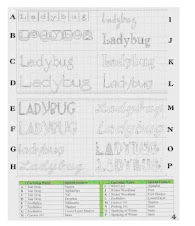
For newbies to my Cartridge Checklist, here's what it looks like:-

Enjoy!! :-)


FeedJit Live Traffic Feed

Thank you for visiting ladybug

Thank you for visiting ladybug

Birdie thank you

Birdie thank you