Hiya. When I uploaded my Checklist yesterday, I completely forgot about "Hello Thursday".
What's "Hello Thursday" some of you may be asking?? Well, it's the "3rd Thursday of every month" whereby ProvoCraft Cricut releases brand spankin' new cartridges. They released 7 new ones yesterday:-
* All Sports
* Baby Steps
* Campin’ Critters
* Florals Embellished
* Formal Occasion
* Kate’s ABCs
* Martha Stewart Birthday Cake Art
Even tho it's great that they're bringing out newer ones, it sure is hard to keep up w/ them all. LOL
I have now added the new ones to the Checklist. I have also added:-
* Smiley Cards Digital --- which was available if you purchased and registered your Gypsy before a certain date (which has now passed).
Sorry, again, for not "being on the ball". I'll try better next month. :-)
Please Note:- if you click on the cartridge name on the Checklist --- it will link you to info about that cartridge, on the Cricut website. :-)
Here's the download:- http://www.mediafire.com/?4daou6hh7lzg5f2
Welcome ladybug


Showing posts with label Gypsy. Show all posts
Showing posts with label Gypsy. Show all posts
Friday, January 21, 2011

Thursday, January 20, 2011
Cricut Cartridge Checklist
Hiya! Hope you're all having a nice January --- whether you have the "white stuff" or not. :-)
Have you ever wanted to have a handy checklist, whereby you could keep track of your Cricut cartridges --- whether you registered them or entered the rewards, etc.? Well, I was driving myself nuts w/ having several different lists and trying to keep up w/ all of them; hence, I created an "all in one" checklist.
Here's the scoop of what it contains:-
* registered
* entered into "Rewards"
* linked to Gypsy
* downloaded Gypsy files to computer from Cindy's website
* imported said pix to Gypsy
* wish list
what it looks like:-
Have you ever wanted to have a handy checklist, whereby you could keep track of your Cricut cartridges --- whether you registered them or entered the rewards, etc.? Well, I was driving myself nuts w/ having several different lists and trying to keep up w/ all of them; hence, I created an "all in one" checklist.
Here's the scoop of what it contains:-
* registered
* entered into "Rewards"
* linked to Gypsy
* downloaded Gypsy files to computer from Cindy's website
* imported said pix to Gypsy
* wish list
what it looks like:-

It's broken down into 3 separate lists:-
* Cricut cartridges
* Cricut Lite cartridges
* Cricut Imagine cartridges
These are located on the tabs at the bottom of the spreadsheet.
TIP:- when printing the spreadsheet, print each sheet separately. This way, you'll get the correct page numbering. e.g. print "Cricut" tab (8 pgs.). Next, send to printer:- "Cricut Lite", etc. Don't forget the "title" page. :-)
Any problems, please do not hesitate to contact me, by clicking on "E-MAIL" w/ the li'l ladybug, on my side-bar.
Before I entered my own information, I thought I would share the template w/ you. If you prefer, you could just use mine as a starting point, and then tweak it to your own taste. :-)
You can download it here:-
http://www.mediafire.com/?4daou6hh7lzg5f2 THIS is the latest download!! :-)
Hope you like it!! :-)
Firstly, let me explain, for those who aren't yet aware, about Cindy's website. She is a real sweetheart who has taken a lot of time in creating downloads of the pix on different Cricut cartridges, which you can then download to your Gypsy. She even has a video that shows how to accomplish this.
Here's her website:- http://crazy4crafting.blogspot.com/
Enjoy! :-)
Monday, August 23, 2010
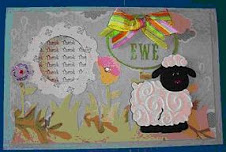
Thank Ewe Card :-)
Made the following card for a dear friend of mine. No idea why the grass is showing "brown" -- it's actually green. Maybe I forgot to water it!! LOL Here's the inside:-
 If you click on each image, you will see it, in greater detail.
Cricut Cartridges used:-
NOTE: the first page has the ovals and “ewes”. Make sure you “hide contour” the “thank” on the “thank ewe” oval. I saved it w/ the “hide contour” on but, for whatever reason, it didn’t stay.
 Here's the inside:-
 If you click on each image, you will see it, in greater detail.
RECIPE:-
Tools/Items:-
Cricut Expression
Cricut Design Studio
Cricut Cartridges (see below)
Cricut Cartridges (see below)
Cuttlebug – Divine Swirls folder
I-Rock tool and gems
Martha Stewart Round the Page punch - Raindrops
Glue (regular, Glue Glider Pro & Zig Two-Way for small items)
I-Rock tool and gems
Martha Stewart Round the Page punch - Raindrops
Glue (regular, Glue Glider Pro & Zig Two-Way for small items)
Patterned Paper
Cardstock
Stickles – Waterfall, Lavender, Magenta
Ribbon
Popdots
Cardstock
Stickles – Waterfall, Lavender, Magenta
Ribbon
Popdots
Cricut Cartridges used:-
Animal Kingdom - sheep
Just Because Cards – card base, front, EWE’s, stencil
Straight from the Nest – grass, flowers
This card was completely designed, using the Cricut Design Studio. If you would like my cut file, here are the links for the download. I will also place it in my “FREE FILES” section.
Design Studio cut file:- http://www.mediafire.com/?g784uerm0zgvykd
Gypsy file:- http://www.mediafire.com/?l7gwcphaotwa848
The sentiment was computer-generated.
The scalloped circle was from something I had before. I have nooooo idea where it came from – if it was a Cricut cut or from a punch, or maybe even my Slice machine. :-)
Just Because Cards – card base, front, EWE’s, stencil
Straight from the Nest – grass, flowers
This card was completely designed, using the Cricut Design Studio. If you would like my cut file, here are the links for the download. I will also place it in my “FREE FILES” section.
Design Studio cut file:- http://www.mediafire.com/?g784uerm0zgvykd
Gypsy file:- http://www.mediafire.com/?l7gwcphaotwa848
The sentiment was computer-generated.
The scalloped circle was from something I had before. I have nooooo idea where it came from – if it was a Cricut cut or from a punch, or maybe even my Slice machine. :-)
NOTE: the first page has the ovals and “ewes”. Make sure you “hide contour” the “thank” on the “thank ewe” oval. I saved it w/ the “hide contour” on but, for whatever reason, it didn’t stay.
Wednesday, August 18, 2010
Debut of. . . . .Gina!
 My Baby Girl Gypsy has finally been dubbed. . . . . .Georgina; elsewise known as “Gina”. She’s a cousin to George (George & Basic Shapes cart.). :-)
Click on her and she has a li'l message for you. :-)
 Earth Worker:- planter, cultivator, grower
I chose this name as I feel my li’l Gypsy is a planter, cultivator and grower of the creativity that she generates.
She’s sporting a new outfit:- her NuShield screen protector. She LOVES it. It feels nice and cozy and her stylus just glides across it. :-)
If you wish to doll up your Gypsy w/ one of these, here are the partic’s:-
http://nushield.com/
On right-hand side, under “Applications”:-
* Click on “Handheld Devices”
* Then “ProvoCraft”
* Under “Model”, click on “Gypsy”
* Then, “Select Film Type”
And you’re good to go!
DISCLAIMER:- I am in no way affiliated w/ this Company. I’m just very happy w/ their product and wanted to share w/ all of you.
Subscribe to:
Posts (Atom)
Thank you for visiting ladybug

Birdie thank you